


Die DocuWare-Integration bzw. DocuWare-Schnittstelle DocuWareConnectPro von der gid GmbH ermöglicht ein intelligentes Dokumentenmanagement direkt im CRM – schnell, effizient und benutzerfreundlich.

Entdecken Sie auch unsere CRM-Erweiterungen und individuellen Lösungen. Bei Fragen hilft unsere Kontaktseite weiter.

Mehr zu DocuWare selbst erfahren Sie bei DocuWare.


Routenplaner

DocuWare Integration with CAS Maecenas CRM

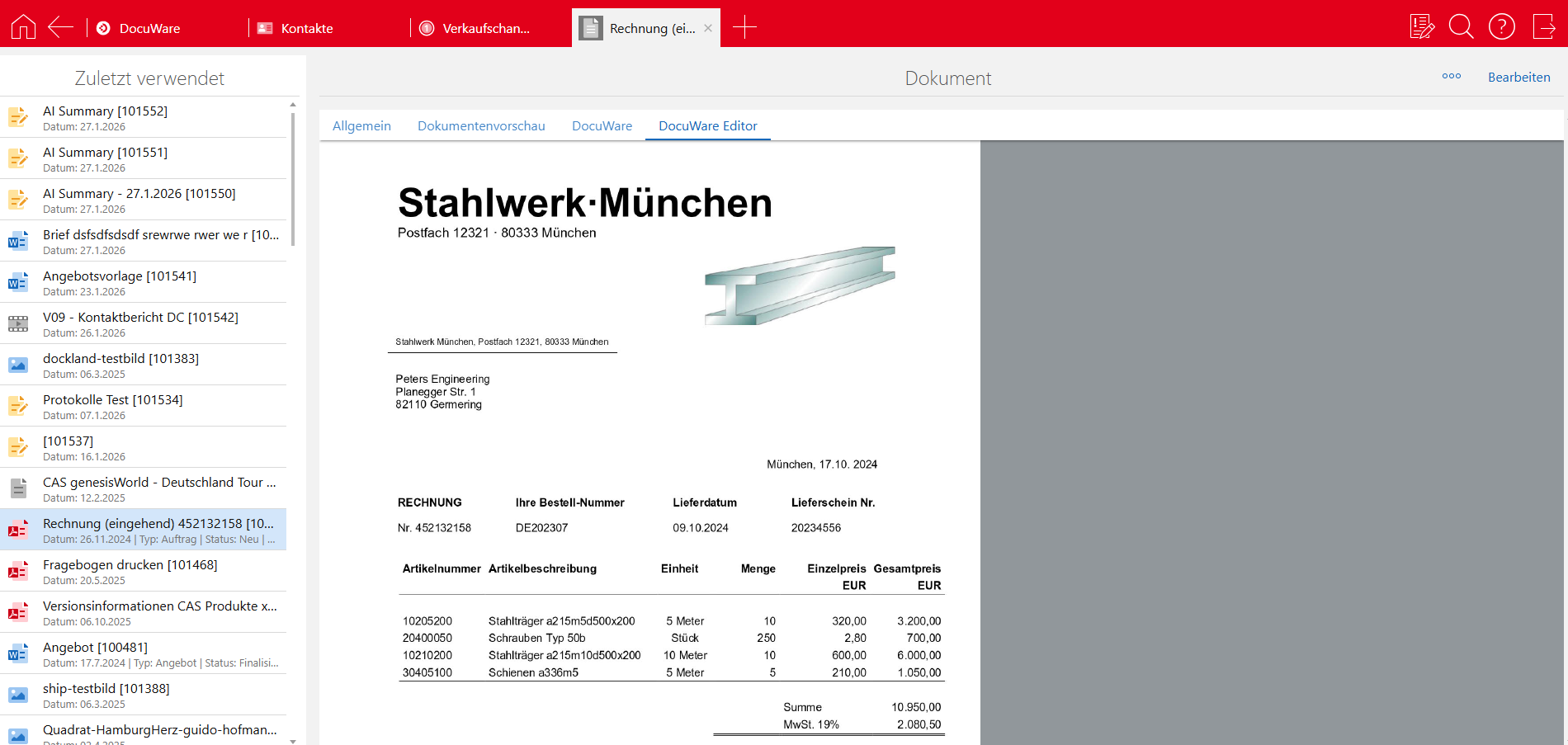
The DocuWareConnectPro interface integrates with the SmartDesign user interface of CAS Maecenas, enabling users to access and edit audit-proof, version-controlled documents and workflows from DocuWare within the system.

What makes this special is that, depending on their access rights, CRM users can also access information transparently at any time without needing a DocuWare licence. Efficiency is particularly important in the non-profit sector to ensure valuable resources are used effectively.

This increases efficiency and transparency and helps to ‘boost productivity’.

Customers who already use DocuWare are, by their very nature, saving several hours of working time each day. By extending and utilising the DocuWare interface within the Maecenas CRM, further valuable time is freed up to build genuine, human relationships. At the same time, you reduce errors caused by copying files back and forth and enhance security, as defined workflows, for example, run smoothly and transparently.

Take a first look at our DocuWare Integration

Documents at your fingertips, exactly when you need them

The integration of the DocuWare DMS into the CAS genesisWorld CRM system allows you to access documents in DocuWare even without a DocuWare licence.

The auditor will be delighted

When an audit is due, beads of sweat start to form on your forehead. But with DocuWare integration, that’s a thing of the past. Because you can access the correct documents at any time. This means your assistant can easily find and display any document that’s currently needed at the touch of a button, directly within the CRM.

Notes on invoices – readable by everyone, including highlighted text

What’s stopping you from finally making the switch to a paperless office? Is it the belief that you’ll no longer be able to write notes on paper? Wrong! You can add notes directly to the document within the CRM – you can even highlight text just as you would with a highlighter.
DocuWare Integration CRM CAS genesisWorld SmartWe gid Norderstedt DMS

Frequently asked questions

Documents can be transferred to and from DocuWare via the interface. DocuWare can be used as both a source and a target system.

The following are among the possible connected source or target systems:

  • CAS genesisWorld
  • Windows file server
  • Microsoft SharePoint
  • FTP, SFTP, or FTPS

In addition to the documents themselves, metadata (index fields) can also be transferred bidirectionally – that is, to and from DocuWare.

Typical examples are:

  • Invoice number
  • Amounts
  • Project participants
  • Status information

Yes, the interface is multi-tenant capable and can process multiple clients cleanly and separately.

A truly unique feature:

The interface acts on behalf of the actual user, not as a technical interface user.

Example:

  • If you create a document in genesisWorld and also have a DocuWare account, your name—not the interface user—will appear in the DocuWare change history.
  • This is a significant advantage, especially from an auditing and compliance perspective.

Yes. The interface allows for selective work:

Transfer of only specific document types
Transfer of only changes instead of entire datasets

This ensures that data is only transferred where it is actually needed.

Examples:

  • Customer-related documents from DocuWare to SharePoint
  • Quotes from the CRM to DocuWare

No. To reduce storage costs, a link to DocuWare can be transferred instead.

The document can then be opened directly in the CRM—without duplicate storage.

A very new and powerful feature:

Simply set an out-of-office message in Outlook 365.

This message is automatically transferred to DocuWare, so that:

  • Tasks go directly to your designated substitute
  • escalations don’t occur after several days
  • no duplicate absence management is required

Einfach mal Kontakt zu uns aufnehmen.

Hier gibt’s Yesss-Momente & zukunftsfähige Prozesse
für Ihr Geschäft.

Die Gelegenheit ergreifen &
Ihr Geschäft zukunftsfähig aufstellen.

Wir vernetzen Ihre Systeme, automatisieren Abläufe und schaffen Freiräume für das, was Ihr Unternehmen wirklich voranbringt.